Arquitectura Event-Driven Serverless
Pipeline de procesamiento de imágenes desacoplado con S3 + SQS + Lambda + DynamoDB con resiliencia end-to-end.
Problema & Solución
Problema
Una plataforma necesita procesar imágenes subidas por usuarios (resize a múltiples resoluciones, extracción de metadata, generación de thumbnails) sin bloquear el request del cliente. El procesamiento puede tardar segundos y el sistema debe ser resiliente a fallos del procesador sin perder trabajos. El volumen es variable: de 10 a 10,000 uploads/hora.
Solución
Arquitectura event-driven completamente serverless: S3 emite eventos en cada upload, que van a SQS (buffer + retry automático + DLQ). Lambda se dispara via Event Source Mapping, procesa la imagen (Python + Pillow), guarda resultados en S3 output y metadata en DynamoDB, notifica via SNS. SQS actúa como buffer desacoplando el rate de uploads del rate de procesamiento. DLQ captura trabajos que fallaron 3 veces.
Diagrama de Arquitectura
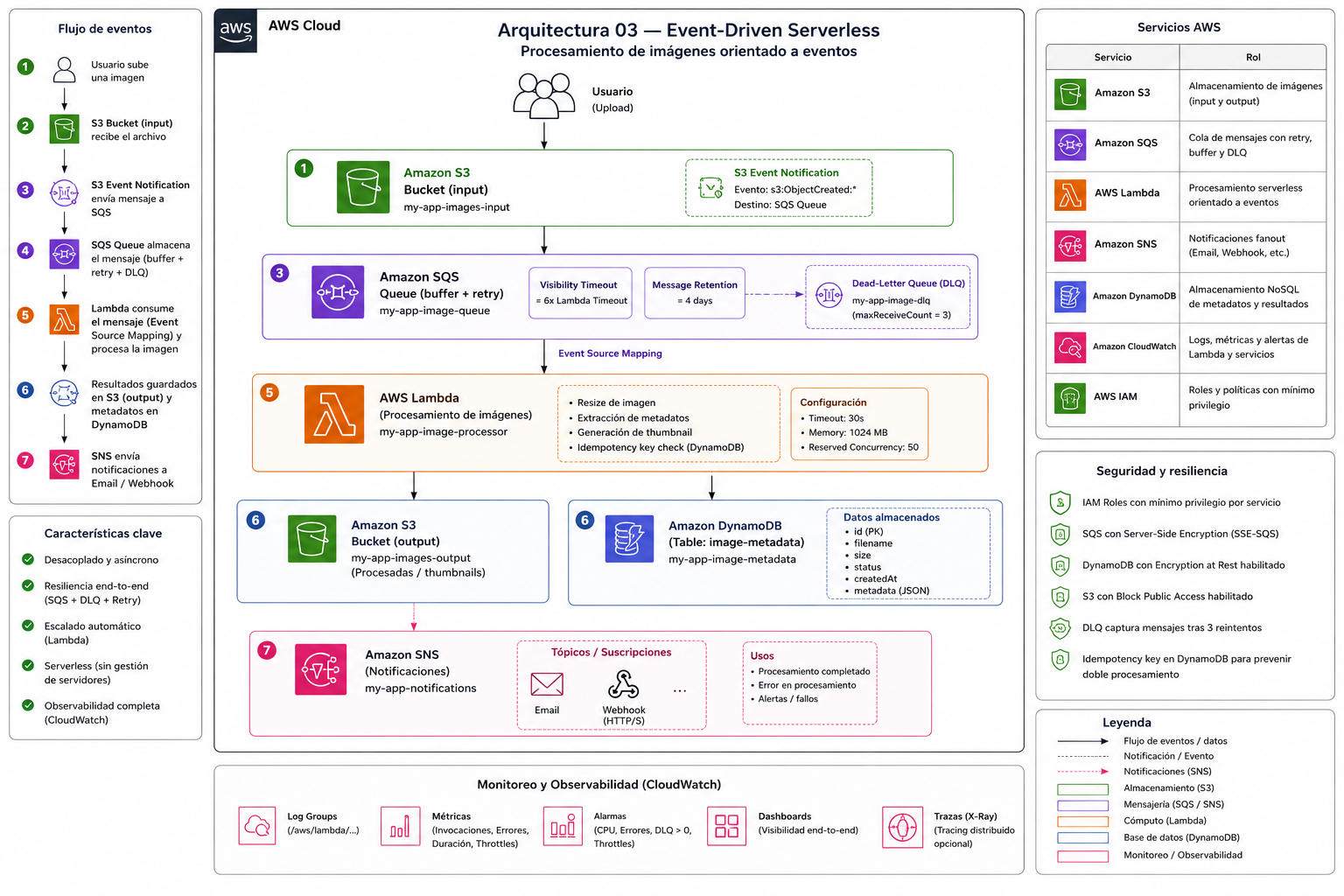
Cómo Funciona
Upload de imagen y disparo del evento S3
El usuario sube una imagen via API Gateway + S3 Presigned PUT URL (recomendado) o directamente. S3 emite un evento s3:ObjectCreated:* en cuanto el objeto está disponible. S3 Event Notifications tienen entrega at-least-once — es posible (aunque raro) recibir el mismo evento dos veces, por eso se implementa idempotencia en Lambda.
SQS como buffer y garantía de entrega
S3 envía el evento a SQS. El VisibilityTimeout (360s = 6x el timeout de Lambda) es crítico: mientras Lambda procesa el mensaje, SQS lo oculta. Si Lambda termina exitosamente, elimina el mensaje. Si Lambda falla o se timeout, después de 360s SQS hace el mensaje visible nuevamente para reintento. MaxReceiveCount=3: después de 3 fallos, el mensaje va a la DLQ.
Lambda Event Source Mapping y batching
Lambda consume mensajes de SQS en batches de hasta 10. Con ReportBatchItemFailures, Lambda puede indicar cuáles mensajes del batch fallaron (partial batch response) en lugar de fallar el batch completo. ReservedConcurrency=50 previene que un pico de uploads consuma todo el límite de concurrencia regional de Lambda (1000 por defecto).
Procesamiento de imagen en Lambda (Python + Pillow)
Lambda descarga la imagen de S3 en memoria. Pillow genera 3 versiones: 800x600 (full), 400x300 (medium), 150x150 (thumbnail). Cada versión se sube a S3 output con un prefix organizado: resized/800x600/uuid.jpg. El procesamiento ocurre en memoria (no hay disco en Fargate/Lambda que sea necesario). Para imágenes >10MB se puede usar /tmp (512MB disponibles en Lambda).
Persistencia de metadata en DynamoDB
Lambda hace PutItem en DynamoDB con: imageId (partition key = S3 object key), status ('processed' o 'failed'), sizes (lista de S3 paths de las versiones generadas), processedAt (timestamp ISO), fileSize, mimeType, dimensions originales. La tabla tiene TTL habilitado: los items expiran después de 90 días automáticamente.
Notificación via SNS y manejo de DLQ
Lambda publica en SNS con el resultado del procesamiento. SNS puede fanout a múltiples suscriptores: Lambda para notificar al usuario vía WebSocket, email, webhook de terceros. Si Lambda falla 3 veces (SQS MaxReceiveCount), el mensaje va a la DLQ. Una CloudWatch Alarm monitorea ApproximateNumberOfMessagesVisible en la DLQ — si >0, notifica al equipo de operaciones.
Servicios AWS
Amazon S3 (input + output)
Almacenamiento de imágenes originales y procesadas
Bucket input: trigger de eventos. Bucket output: imágenes procesadas por tamaño. Lifecycle: mover a S3-IA después de 30 días, Glacier después de 90 días.
Amazon SQS (Standard Queue)
Buffer desacoplado con garantía de entrega y retry
VisibilityTimeout=360s (6x Lambda timeout). MaxReceiveCount=3. MessageRetentionPeriod=86400s. Dead-Letter Queue separada.
AWS Lambda (Python 3.12)
Procesamiento serverless de imágenes
512MB memoria, 60s timeout. Pillow para procesamiento de imágenes. ReservedConcurrency=50. Lambda Layer para Pillow.
Amazon DynamoDB (On-Demand)
Metadata y estado del procesamiento
Partition key: imageId. On-Demand billing: paga por request, no por capacidad. TTL en atributo expiresAt (90 días). GSI en status para consultar por estado.
Amazon SNS
Notificaciones fanout
Topic con suscriptores: Lambda (WebSocket), Email (SES), SQS (audit log). Filter policies para routing selectivo.
SQS Dead-Letter Queue
Captura mensajes que fallaron tras 3 reintentos
Separada de la queue principal. CloudWatch Alarm en ApproximateNumberOfMessagesVisible > 0. Análisis manual de mensajes fallidos.
Decisiones Técnicas (Trade-offs)
S3 → SQS → Lambda vs S3 → Lambda directo
Elegido
S3 → SQS → Lambda
Alternativas
- —S3 → Lambda directo — más simple, pero sin retry automático ni DLQ
- —S3 → EventBridge → Lambda — mejor para enrutamiento complejo con múltiples destinos
- —S3 → Kinesis → Lambda — para streaming de alta velocidad (>1000 eventos/s)
Razón
SQS actúa como buffer resiliente. Sin SQS, si Lambda falla (error, timeout, concurrencia agotada), el evento S3 se pierde. Con SQS: retry automático con backoff, DLQ para mensajes problemáticos, control de concurrencia via SQS batch size y Lambda reserved concurrency, y visibilidad de mensajes pendientes en las métricas de SQS.
DynamoDB On-Demand vs Provisioned
Elegido
DynamoDB On-Demand
Alternativas
- —DynamoDB Provisioned + Auto Scaling — mejor para cargas predecibles, más barato
- —RDS PostgreSQL — si se necesitan joins o transacciones complejas entre entidades
Razón
El patrón de acceso es completamente impredecible (depende del rate de uploads). On-Demand escala automáticamente a cualquier carga sin capacity planning. El costo por request ($1.25/M writes, $0.25/M reads) es más alto que Provisioned para cargas sostenidas, pero elimina la complejidad de gestión de WCU/RCU.
Lambda Layer vs Container Image para Pillow
Elegido
Lambda Layer
Alternativas
- —Container Image — más control, cold start similar, imagen más grande
- —Pre-instalar en el deployment package — acoplamiento, más lento de subir
Razón
Pillow compilado para Amazon Linux 2023 se empaqueta como Lambda Layer (~8MB). Las Lambda Layers permiten compartir dependencias entre funciones y reducen el tamaño del deployment package. Container Images (~200MB) son preferibles para dependencias muy grandes o cuando se necesita control total del SO.
Seguridad
- ✓Lambda Execution Role con least privilege: solo s3:GetObject en bucket input, s3:PutObject en bucket output, dynamodb:PutItem en la tabla específica, sns:Publish en el topic específico.
- ✓SQS con SSE-SQS (Server-Side Encryption) habilitado.
- ✓DynamoDB con encryption at rest usando AWS managed key.
- ✓S3 buckets con BlockPublicAccess completo. Output bucket con bucket policy que solo permite Lambda.
- ✓VPC Endpoints para S3 y DynamoDB (opcional): tráfico nunca sale a Internet.
- ✓Lambda function URL o API Gateway con autorización para el endpoint de upload.
- ✓CloudTrail logging para todas las operaciones de S3, DynamoDB y Lambda invocations.
Escalabilidad
- ↑Lambda escala automáticamente hasta 1000 ejecuciones concurrentes por región (límite ajustable).
- ↑ReservedConcurrency=50 en esta función previene consumir el burst limit regional completo.
- ↑SQS desacopla completamente el rate de uploads del rate de procesamiento — puede acumular millones de mensajes.
- ↑DynamoDB On-Demand: sin límite práctico de throughput en condiciones normales.
- ↑S3 soporta miles de operaciones por segundo por prefijo.
- ↑Para procesar imágenes de >50MB: usar S3 Multipart Upload y Lambda con /tmp (512MB).
- ↑Si el procesamiento requiere GPU (ML/AI): cambiar Lambda por ECS Fargate con GPU.
Estimación de Costos
| Servicio / Concepto | Estimado |
|---|---|
| Lambda (512MB, 60s promedio) | $0.0000083334/GB-segundo |
| SQS Standard Queue | $0.40/millón de requests |
| DynamoDB On-Demand | $1.25/M writes · $0.25/M reads |
| S3 Storage + Requests | $0.023/GB + $0.005/1000 PUTs |
| SNS | $0.50/M notificaciones |
| Total estimado (10K imágenes/mes) | ~$5–$10/mes |
Snippets de Código
Lambda function: procesa imágenes de S3 disparadas por eventos SQS.

Flujo:
  S3 ObjectCreated → SQS → este handler → 3 versiones en S3 + DynamoDB + SNS

Implementa:
  - ReportBatchItemFailures: solo reintenta mensajes fallidos del batch
  - Idempotencia via DynamoDB: evita doble procesamiento si el evento llega dos veces
  - S3 TestEvent: ignora eventos de prueba enviados al configurar notificaciones
"""

import boto3
import datetime
import io
import json
import os
import time
import urllib.parse

from PIL import Image

# ── Clientes AWS ──────────────────────────────────────────────────────────────

s3_client  = boto3.client("s3")
dynamodb   = boto3.resource("dynamodb")
sns_client = boto3.client("sns")

# ── Variables de entorno ──────────────────────────────────────────────────────

BUCKET_NAME    = os.environ["BUCKET_NAME"]
TABLE_NAME     = os.environ["DYNAMODB_TABLE"]
SNS_TOPIC_ARN  = os.environ["SNS_TOPIC_ARN"]
RESIZED_PREFIX = os.environ.get("RESIZED_PREFIX", "image-resize/resized")
ENVIRONMENT    = os.environ.get("ENVIRONMENT", "dev")

# ── Configuración de resizing ─────────────────────────────────────────────────

SIZES = [
    ("800x600", 800, 600),
    ("400x300", 400, 300),
    ("150x150", 150, 150),
]

FORMAT_MAP = {
    "jpg":  "JPEG",
    "jpeg": "JPEG",
    "png":  "PNG",
    "gif":  "GIF",
    "webp": "WEBP",
    "svg":  "PNG",   # Pillow no soporta SVG → convierte a PNG
}


# ── Handler principal ─────────────────────────────────────────────────────────

def lambda_handler(event, context):
    """
    Punto de entrada. Itera sobre los registros SQS del batch.
    Retorna batchItemFailures para que SQS reintente solo los mensajes fallidos.
    """
    failed = []

    for record in event.get("Records", []):
        message_id = record["messageId"]
        try:
            _process_sqs_record(record)
        except Exception as exc:
            print(f"[ERROR] messageId={message_id}: {exc}")
            failed.append({"itemIdentifier": message_id})

    return {"batchItemFailures": failed}


# ── Procesamiento de un registro SQS ─────────────────────────────────────────

def _process_sqs_record(record: dict) -> None:
    body = json.loads(record["body"])

    # S3 envía un evento de prueba al configurar la notificación → ignorar
    if body.get("Event") == "s3:TestEvent":
        print("[INFO] S3 test event recibido, ignorando.")
        return

    for s3_record in body.get("Records", []):
        bucket = s3_record["s3"]["bucket"]["name"]
        key    = urllib.parse.unquote_plus(s3_record["s3"]["object"]["key"])
        size   = s3_record["s3"]["object"].get("size", 0)
        _process_image(bucket, key, size)


# ── Procesamiento de una imagen ───────────────────────────────────────────────

def _process_image(bucket: str, key: str, file_size: int) -> None:
    table = dynamodb.Table(TABLE_NAME)

    # Idempotencia: si ya fue procesada, salir sin hacer nada
    existing = table.get_item(Key={"imageId": key})
    if existing.get("Item", {}).get("status") == "processed":
        print(f"[INFO] Ya procesada (idempotente): {key}")
        return

    print(f"[INFO] Procesando: {key} ({file_size} bytes)")

    # Descargar imagen de S3
    response     = s3_client.get_object(Bucket=bucket, Key=key)
    image_data   = response["Body"].read()
    content_type = response.get("ContentType", "image/jpeg")

    img = Image.open(io.BytesIO(image_data))
    original_w, original_h = img.size

    ext      = key.rsplit(".", 1)[-1].lower()
    base     = key.rsplit("/", 1)[-1].rsplit(".", 1)[0]
    fmt      = FORMAT_MAP.get(ext, "JPEG")
    out_ext  = "png" if ext == "svg" else ext
    out_mime = "image/png" if ext == "svg" else content_type

    # Generar las 3 versiones redimensionadas
    generated_keys = []
    for label, max_w, max_h in SIZES:
        resized = img.copy()
        resized.thumbnail((max_w, max_h), Image.LANCZOS)

        buf = io.BytesIO()
        save_kwargs = {"format": fmt}
        if fmt == "JPEG":
            save_kwargs["quality"] = 85
            save_kwargs["optimize"] = True
        resized.save(buf, **save_kwargs)
        buf.seek(0)

        output_key = f"{RESIZED_PREFIX}/{label}/{base}.{out_ext}"
        s3_client.put_object(
            Bucket=BUCKET_NAME,
            Key=output_key,
            Body=buf.getvalue(),
            ContentType=out_mime,
            ContentDisposition="inline",
        )
        generated_keys.append(output_key)
        print(f"[INFO] Subida: {output_key}")

    now_iso  = datetime.datetime.utcnow().isoformat() + "Z"
    ttl_unix = int(time.time()) + 90 * 24 * 3600  # expira en 90 días

    # Persistir metadata en DynamoDB
    table.put_item(
        Item={
            "imageId":    key,
            "status":     "processed",
            "sizes":      generated_keys,
            "originalKey": key,
            "fileSize":   file_size,
            "mimeType":   content_type,
            "dimensions": f"{original_w}x{original_h}",
            "processedAt": now_iso,
            "expiresAt":  ttl_unix,
            "environment": ENVIRONMENT,
        }
    )

    # Notificar vía SNS
    sns_client.publish(
        TopicArn=SNS_TOPIC_ARN,
        Subject=f"✅ Tus imágenes ya están listas",
        Message=json.dumps(
            {
                "title": "Imágenes procesadas correctamente",
                "message": (
                    f"Hola 👋

"
                    f"Tu imagen '{base}' fue procesada exitosamente y ya se "
                    f"encuentran disponibles las versiones optimizadas.

"
                    f"📐 Tamaño original: {original_w}x{original_h}
"
                    f"🖼️ Versiones generadas: {len(generated_keys)}
"
                    f"📦 Tamaño del archivo: {file_size} bytes

"
                    f"Gracias por usar nuestro servicio 🚀"
                ),
                "imageId": key,
                "sizes": generated_keys,
                "processedAt": now_iso,
                "environment": ENVIRONMENT,
            },
            ensure_ascii=False,
            indent=2,
        ),
    )

print(f"[INFO] Completado: {key} → {generated_keys}")terraform {
required_providers {
aws = {
source = "hashicorp/aws"
version = "~> 6.0"
}
archive = {
source = "hashicorp/archive"
version = "~> 2.0"
}
null = {
source = "hashicorp/null"
version = "~> 3.0"
}
}
required_version = ">= 1.4.0"
}
provider "aws" {
region = var.aws_region
profile = var.aws_profile
}
# ── Data sources ──────────────────────────────────────────────────────────────
data "aws_caller_identity" "current" {}
data "aws_region" "current" {}
# ── Locals: naming & tags aplicados a todos los recursos ─────────────────────
locals {
prefix = "img-proc-env"
tags = {
Project = "aws-event-driven-image-processing-platform"
Architecture = "event-driven-serverless"
Environment = var.env
ManagedBy = "terraform"
Owner = "Alfredo Jose Dominguez Hernandez"
Repository = "aws-event-driven-image-processing-platform"
}
}
#################################################
# S3 BUCKET — almacenamiento de imágenes input/output
#################################################

resource "aws_s3_bucket" "images" {
  # Nombre único por cuenta y entorno
  bucket = "{local.prefix}-images-{data.aws_caller_identity.current.account_id}"

  tags = merge(local.tags, {
    Name    = "{local.prefix}-images"
    Purpose = "image-storage-input-output"
  })
}

resource "aws_s3_bucket_public_access_block" "images" {
  bucket = aws_s3_bucket.images.id

  block_public_acls       = true
  ignore_public_acls      = true
  block_public_policy     = true
  restrict_public_buckets = true
}

resource "aws_s3_bucket_versioning" "images" {
  bucket = aws_s3_bucket.images.id

  versioning_configuration {
    status = "Enabled"
  }
}

resource "aws_s3_bucket_server_side_encryption_configuration" "images" {
  bucket = aws_s3_bucket.images.id

  rule {
    apply_server_side_encryption_by_default {
      sse_algorithm = "AES256"
    }
    bucket_key_enabled = true
  }
}

resource "aws_s3_bucket_lifecycle_configuration" "images" {
  bucket = aws_s3_bucket.images.id

  rule {
    id     = "expire-input-originals"
    status = "Enabled"

    filter {
      prefix = "image-resize/input/"
    }

    expiration {
      days = 7
    }
  }

  rule {
    id     = "expire-resized-outputs"
    status = "Enabled"

    filter {
      prefix = "image-resize/resized/"
    }

    expiration {
      days = 90
    }
  }
}

#################################################
# S3 EVENT NOTIFICATION → SQS
# Dispara cuando se sube un objeto a image-resize/input/
# depends_on: la política de SQS debe existir primero para que AWS
# pueda validar que S3 tiene permiso de escribir en la cola.
#################################################

resource "aws_s3_bucket_notification" "images" {
  depends_on = [aws_sqs_queue_policy.processing]

  bucket = aws_s3_bucket.images.id

  queue {
    queue_arn     = aws_sqs_queue.processing.arn
    events        = ["s3:ObjectCreated:*"]
    filter_prefix = "image-resize/input/"
  }
}#################################################
# SNS TOPIC — notificaciones del pipeline
# Lambda publica aquí tras procesar o fallar.
# Suscriptores opcionales: email, webhook, otra Lambda.
#################################################
resource "aws_sns_topic" "notifications" {
name = "{local.prefix}-notifications"
tags = merge(local.tags, {
Name = "{local.prefix}-notifications"
Purpose = "processing-notifications"
})
}
# Suscripción por email (opcional — solo si notification_email != "")
# AWS enviará un correo de confirmación; debe aceptarse manualmente.
resource "aws_sns_topic_subscription" "email" {
count = var.notification_email != "" ? 1 : 0
topic_arn = aws_sns_topic.notifications.arn
protocol = "email"
endpoint = var.notification_email
}
#################################################
# SQS DEAD-LETTER QUEUE
# Recibe mensajes que fallaron 3 veces consecutivas.
# Retención máxima (14 días) para dar tiempo al equipo de revisar.
#################################################

resource "aws_sqs_queue" "dlq" {
  name = "{local.prefix}-dlq"

  message_retention_seconds = 1209600 # 14 días (máximo)
  sqs_managed_sse_enabled   = true

  tags = merge(local.tags, {
    Name    = "{local.prefix}-dlq"
    Purpose = "dead-letter-queue"
  })
}

#################################################
# SQS PROCESSING QUEUE
# Buffer entre el evento S3 y la ejecución de Lambda.
# VisibilityTimeout = 6× el timeout de Lambda (best practice AWS).
# MaxReceiveCount = 3: tras 3 fallos el mensaje pasa a la DLQ.
#################################################

resource "aws_sqs_queue" "processing" {
  name = "{local.prefix}-processing"

  # 6× lambda_timeout: mientras Lambda procesa, SQS oculta el mensaje
  visibility_timeout_seconds = var.lambda_timeout * 6

  message_retention_seconds = 86400 # 1 día
  sqs_managed_sse_enabled   = true

  redrive_policy = jsonencode({
    deadLetterTargetArn = aws_sqs_queue.dlq.arn
    maxReceiveCount     = 3
  })

  tags = merge(local.tags, {
    Name    = "{local.prefix}-processing"
    Purpose = "image-processing-queue"
  })
}

#################################################
# SQS QUEUE POLICY
# Permite que Amazon S3 publique mensajes en la cola.
# La condición aws:SourceArn restringe el acceso al bucket concreto,
# evitando el confused deputy problem.
#################################################

resource "aws_sqs_queue_policy" "processing" {
  queue_url = aws_sqs_queue.processing.id

  policy = jsonencode({
    Version = "2012-10-17"
    Statement = [
      {
        Sid    = "AllowS3SendMessage"
        Effect = "Allow"
        Principal = {
          Service = "s3.amazonaws.com"
        }
        Action   = "sqs:SendMessage"
        Resource = aws_sqs_queue.processing.arn
        Condition = {
          ArnEquals = {
            "aws:SourceArn" = aws_s3_bucket.images.arn
          }
        }
      }
    ]
  })
}
#################################################
# BUILD AUTOMÁTICO DEL PAQUETE LAMBDA
# Se ejecuta en terraform apply cuando handler.py o
# requirements.txt cambian. Instala Pillow compilado para
# Linux x86_64 (manylinux) dentro de lambda/package/.
#################################################

resource "null_resource" "lambda_build" {
  triggers = {
    handler_md5      = filemd5("{path.module}/lambda/handler.py")
    requirements_md5 = filemd5("{path.module}/lambda/requirements.txt")
  }

  provisioner "local-exec" {
    command     = "python build.py"
    working_dir = path.module
  }
}

#################################################
# LAMBDA DEPLOYMENT PACKAGE
# archive_file depende de null_resource para asegurar que
# lambda/package/ ya existe antes de ser empaquetado.
#################################################

data "archive_file" "lambda" {
  depends_on = [null_resource.lambda_build]

  type        = "zip"
  source_dir  = "{path.module}/lambda/package"
  output_path = "{path.module}/.build/handler.zip"
}

#################################################
# LAMBDA FUNCTION — procesamiento de imágenes
# Runtime: Python 3.12
# Timeout: var.lambda_timeout (default 60 s)
# Memory: var.lambda_memory_mb (default 512 MB)
# reserved_concurrent_executions: -1 = sin reserva,
#   usa el pool general de la cuenta (correcto para dev).
#   En producción cambiar a 50+ en terraform.tfvars.
#################################################

resource "aws_lambda_function" "image_processor" {
  function_name = "{local.prefix}-processor"
  role          = aws_iam_role.lambda.arn

  handler     = "handler.lambda_handler"
  runtime     = "python3.12"
  timeout     = var.lambda_timeout
  memory_size = var.lambda_memory_mb

  reserved_concurrent_executions = var.lambda_reserved_concurrency

  filename         = data.archive_file.lambda.output_path
  source_code_hash = data.archive_file.lambda.output_base64sha256

  environment {
    variables = {
      BUCKET_NAME    = aws_s3_bucket.images.bucket
      DYNAMODB_TABLE = aws_dynamodb_table.images.name
      SNS_TOPIC_ARN  = aws_sns_topic.notifications.arn
      RESIZED_PREFIX = "image-resize/resized"
      ENVIRONMENT    = var.env
    }
  }

  tags = merge(local.tags, {
    Name    = "{local.prefix}-processor"
    Purpose = "image-processing-function"
  })
}

#################################################
# EVENT SOURCE MAPPING — SQS → Lambda
# batch_size: hasta 10 mensajes por invocación
# ReportBatchItemFailures: solo reintenta mensajes
#   fallidos del batch, no el batch completo
#################################################

resource "aws_lambda_event_source_mapping" "sqs_trigger" {
  event_source_arn = aws_sqs_queue.processing.arn
  function_name    = aws_lambda_function.image_processor.arn

  batch_size = var.sqs_batch_size

  function_response_types = ["ReportBatchItemFailures"]
}#################################################
# IAM ROLE — ejecución de Lambda
#################################################
resource "aws_iam_role" "lambda" {
name = "{local.prefix}-lambda-role"
assume_role_policy = jsonencode({
Version = "2012-10-17"
Statement = [
{
Sid = "AllowLambdaAssumeRole"
Effect = "Allow"
Principal = {
Service = "lambda.amazonaws.com"
}
Action = "sts:AssumeRole"
}
]
})
tags = merge(local.tags, {
Name = "{local.prefix}-lambda-role"
Purpose = "lambda-execution-role"
})
}
# AWS managed policy: CloudWatch Logs (CreateLogGroup, CreateLogStream, PutLogEvents)
resource "aws_iam_role_policy_attachment" "lambda_basic_execution" {
role = aws_iam_role.lambda.name
policy_arn = "arn:aws:iam::aws:policy/service-role/AWSLambdaBasicExecutionRole"
}
#################################################
# IAM INLINE POLICY — permisos de mínimo privilegio
# S3: solo los prefijos input/ y resized/
# SQS: solo la cola de procesamiento
# DynamoDB: solo la tabla de metadata
# SNS: solo el topic de notificaciones
#################################################
resource "aws_iam_role_policy" "lambda_custom" {
name = "{local.prefix}-lambda-policy"
role = aws_iam_role.lambda.id
policy = jsonencode({
Version = "2012-10-17"
Statement = [
{
Sid = "S3ReadInput"
Effect = "Allow"
Action = ["s3:GetObject"]
Resource = [
"{aws_s3_bucket.images.arn}/image-resize/input/*"
]
},
{
Sid = "S3WriteResized"
Effect = "Allow"
Action = ["s3:PutObject"]
Resource = [
"{aws_s3_bucket.images.arn}/image-resize/resized/*"
]
},
{
Sid = "DynamoDBAccess"
Effect = "Allow"
Action = [
"dynamodb:GetItem",
"dynamodb:PutItem",
"dynamodb:UpdateItem"
]
Resource = [aws_dynamodb_table.images.arn]
},
{
Sid = "SNSPublish"
Effect = "Allow"
Action = ["sns:Publish"]
Resource = [aws_sns_topic.notifications.arn]
},
{
Sid = "SQSConsumeMessages"
Effect = "Allow"
Action = [
"sqs:ReceiveMessage",
"sqs:DeleteMessage",
"sqs:GetQueueAttributes",
"sqs:ChangeMessageVisibility"
]
Resource = [aws_sqs_queue.processing.arn]
}
]
})
}
#################################################
# DYNAMODB TABLE — metadata de imágenes procesadas
# Clave: imageId (S3 object key de la imagen original)
# TTL: expiresAt — los ítems expiran a los 90 días automáticamente
#################################################

resource "aws_dynamodb_table" "images" {
  name         = "{local.prefix}-metadata"
  billing_mode = "PAY_PER_REQUEST"
  hash_key     = "imageId"

  attribute {
    name = "imageId"
    type = "S"
  }

  # TTL: Lambda escribe expiresAt como Unix timestamp
  ttl {
    attribute_name = "expiresAt"
    enabled        = true
  }

  point_in_time_recovery {
    enabled = true
  }

  server_side_encryption {
    enabled = true
  }

  tags = merge(local.tags, {
    Name    = "{local.prefix}-metadata"
    Purpose = "image-metadata-storage"
  })
}
#################################################
# CLOUDWATCH LOG GROUP — logs de Lambda
# Creado explícitamente para controlar retención
# y garantizar que los tags del proyecto se apliquen.
#################################################

resource "aws_cloudwatch_log_group" "lambda" {
  name              = "/aws/lambda/{aws_lambda_function.image_processor.function_name}"
  retention_in_days = var.log_retention_days

  tags = merge(local.tags, {
    Name    = "{local.prefix}-lambda-logs"
    Purpose = "lambda-execution-logs"
  })
}

#################################################
# CLOUDWATCH ALARM — mensajes en DLQ
# Se activa si hay ≥1 mensaje visible en la DLQ,
# lo que indica fallos repetidos en el procesamiento.
# Acción: publica en SNS para notificar al equipo de operaciones.
#################################################

resource "aws_cloudwatch_metric_alarm" "dlq_messages" {
  alarm_name          = "{local.prefix}-dlq-not-empty"
  alarm_description   = "La DLQ tiene mensajes — revisa los fallos de procesamiento en Lambda."
  comparison_operator = "GreaterThanThreshold"
  evaluation_periods  = 1
  metric_name         = "ApproximateNumberOfMessagesVisible"
  namespace           = "AWS/SQS"
  period              = 60
  statistic           = "Sum"
  threshold           = 0
  treat_missing_data  = "notBreaching"

  dimensions = {
    QueueName = aws_sqs_queue.dlq.name
  }

  alarm_actions = [aws_sns_topic.notifications.arn]
  ok_actions    = [aws_sns_topic.notifications.arn]

  tags = merge(local.tags, {
    Name    = "{local.prefix}-dlq-alarm"
    Purpose = "dlq-monitoring"
  })
}

#################################################
# CLOUDWATCH ALARM — errores de Lambda
# Se activa si Lambda lanza ≥1 error en el período.
#################################################

resource "aws_cloudwatch_metric_alarm" "lambda_errors" {
  alarm_name          = "{local.prefix}-lambda-errors"
  alarm_description   = "Lambda registró errores en el procesamiento de imágenes."
  comparison_operator = "GreaterThanThreshold"
  evaluation_periods  = 1
  metric_name         = "Errors"
  namespace           = "AWS/Lambda"
  period              = 60
  statistic           = "Sum"
  threshold           = 0
  treat_missing_data  = "notBreaching"

  dimensions = {
    FunctionName = aws_lambda_function.image_processor.function_name
  }

  alarm_actions = [aws_sns_topic.notifications.arn]

  tags = merge(local.tags, {
    Name    = "{local.prefix}-lambda-errors-alarm"
    Purpose = "lambda-error-monitoring"
  })
}

#################################################
# CLOUDWATCH ALARM — throttles de Lambda
# Se activa si Lambda es throttled, lo que indica
# que el reservedConcurrency es insuficiente para la carga.
#################################################

resource "aws_cloudwatch_metric_alarm" "lambda_throttles" {
  alarm_name          = "{local.prefix}-lambda-throttles"
  alarm_description   = "Lambda está siendo throttled — considera aumentar reserved concurrency."
  comparison_operator = "GreaterThanThreshold"
  evaluation_periods  = 1
  metric_name         = "Throttles"
  namespace           = "AWS/Lambda"
  period              = 60
  statistic           = "Sum"
  threshold           = 0
  treat_missing_data  = "notBreaching"

  dimensions = {
    FunctionName = aws_lambda_function.image_processor.function_name
  }

  alarm_actions = [aws_sns_topic.notifications.arn]

  tags = merge(local.tags, {
    Name    = "{local.prefix}-lambda-throttles-alarm"
    Purpose = "lambda-throttle-monitoring"
  })
}
output "bucket_name" {
  description = "Nombre del bucket S3 de imágenes."
  value       = aws_s3_bucket.images.bucket
}

output "bucket_arn" {
  description = "ARN del bucket S3."
  value       = aws_s3_bucket.images.arn
}

output "sqs_queue_url" {
  description = "URL de la cola SQS de procesamiento."
  value       = aws_sqs_queue.processing.id
}

output "sqs_queue_arn" {
  description = "ARN de la cola SQS de procesamiento."
  value       = aws_sqs_queue.processing.arn
}

output "sqs_dlq_url" {
  description = "URL de la Dead-Letter Queue."
  value       = aws_sqs_queue.dlq.id
}

output "dynamodb_table_name" {
  description = "Nombre de la tabla DynamoDB."
  value       = aws_dynamodb_table.images.name
}

output "dynamodb_table_arn" {
  description = "ARN de la tabla DynamoDB."
  value       = aws_dynamodb_table.images.arn
}

output "sns_topic_arn" {
  description = "ARN del topic SNS de notificaciones."
  value       = aws_sns_topic.notifications.arn
}

output "lambda_function_name" {
  description = "Nombre de la función Lambda."
  value       = aws_lambda_function.image_processor.function_name
}

output "lambda_function_arn" {
  description = "ARN de la función Lambda."
  value       = aws_lambda_function.image_processor.arn
}

output "lambda_role_arn" {
  description = "ARN del IAM Role de Lambda."
  value       = aws_iam_role.lambda.arn
}

output "cloudwatch_log_group" {
  description = "Nombre del Log Group de Lambda en CloudWatch."
  value       = aws_cloudwatch_log_group.lambda.name
}

output "env_vars_for_backend" {
  description = "Variables de entorno necesarias para el backend Express."
  value = {
    AWS_BUCKET_NAME = aws_s3_bucket.images.bucket
    AWS_REGION      = var.aws_region
  }
}